How your assistant plans and responds
MINDTRICKS does not treat every message as a single, blind answer. The assistant follows a guided workflow: it decides what to do, gathers information when needed, writes the main reply in chat, and can add optional extras—only along paths you have turned on.
Planning
First, the system figures out the best way to help. It may plan to search the public web, search your uploaded knowledge base, both, or neither—for example, a short greeting might not need any search at all. When features like Canvas documents, diagrams, or quizzes are available, planning can also note when those formats would genuinely help, so later steps know what to aim for.
Response
Next comes the main answer you see in the conversation. This step focuses on a clear, natural-language reply. If research was gathered, it is woven into that answer. Specialized outputs such as full diagrams, long-form documents, or quizzes are not stuffed into this step—they are handled separately so the chat stays readable and each kind of output is produced properly.
Post-response
After the main reply (or in some flows, instead of a long chat answer when a document is the primary deliverable), the system can run follow-up actions: for example, generating a diagram, creating or updating a Canvas document, or building a quiz from the conversation. These are optional and only run when relevant and when you have enabled them. You may also get a short closing message that summarizes what was created so you know where to look.
Tools and routing
You choose which capabilities are on—such as web search, knowledge base search, Canvas, diagrams, or quizzes. The assistant then routes each request along a fitting path: it does not run every step every time. Simple chat may skip research; research-heavy questions may use web and/or your documents; optional post-response work only runs when it makes sense and is allowed. That is how the same product can feel lightweight for small talk and powerful for deep tasks.
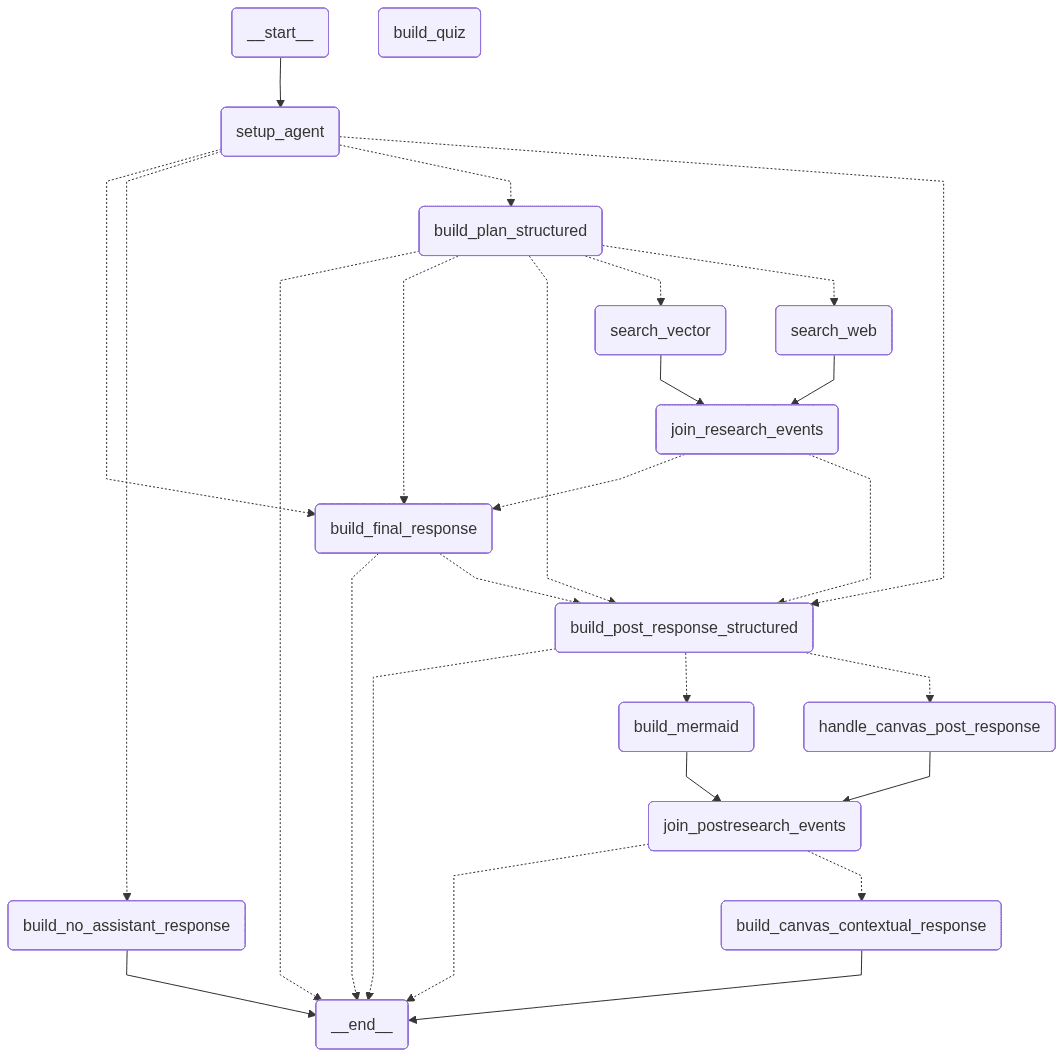
Overview of how steps connect. Your enabled tools and each plan determine which branches actually run.
Behind the scenes, this orchestration is implemented with LangGraph: a graph of steps that can branch and join so the right work runs in the right order—without exposing low-level details in the product experience.